Text Message Program
CropStack Weather Text Alerts
Time-sensitive farm weather alerts by text message.
What the program is
CropStack Weather is a weather-alert and forecast service for commercial farms in the United States. A farm's account holder (the owner or manager) adds the people who should get alerts: themselves, their crew, or their advisers. The account holder then chooses which alerts each person receives. The people who receive texts do not need an account of their own.
Messages come from our dedicated number +1 (689) 407-8425, by SMS or by picture message (MMS). This is a transactional alert program, not marketing: we never send promotional messages.
The program can send these messages:
- Freeze alerts, when the forecast crosses a frost threshold the grower set for a crop block. These can arrive overnight.
- Heat alerts: a morning heads-up on days the heat index is forecast to reach the grower's threshold during crew hours, then hydration reminders about once an hour while it stays above.
- Too-hot-to-spray alerts: a morning "hold sprays" message on days the forecast passes the grower's spray temperature cap.
- Spray-window alerts, when the weather turns against a spray the grower planned.
- Irrigation recommendations: the day's run time, once a day. That is one message for the whole farm, or one for each block if the person is set to get a message per block.
- The morning brief, if the account holder chooses it by text. It ends with a link to the full brief on our site and can include a chart image.
- A morning check-in after a freeze night, only for people the account holder turned it on for: one question, the morning after a night they got a freeze warning, asking the low temperature at the coldest spot and when the water went on and off. Reply SKIP to stop just these questions.
- Replies to texts sent to us. Field crews can text the number to log when irrigation goes on or off and to report the overnight low. We reply to confirm.
How someone is signed up
Consent is collected in the account holder's dashboard, in one of two places. Texting is off by default for every person.
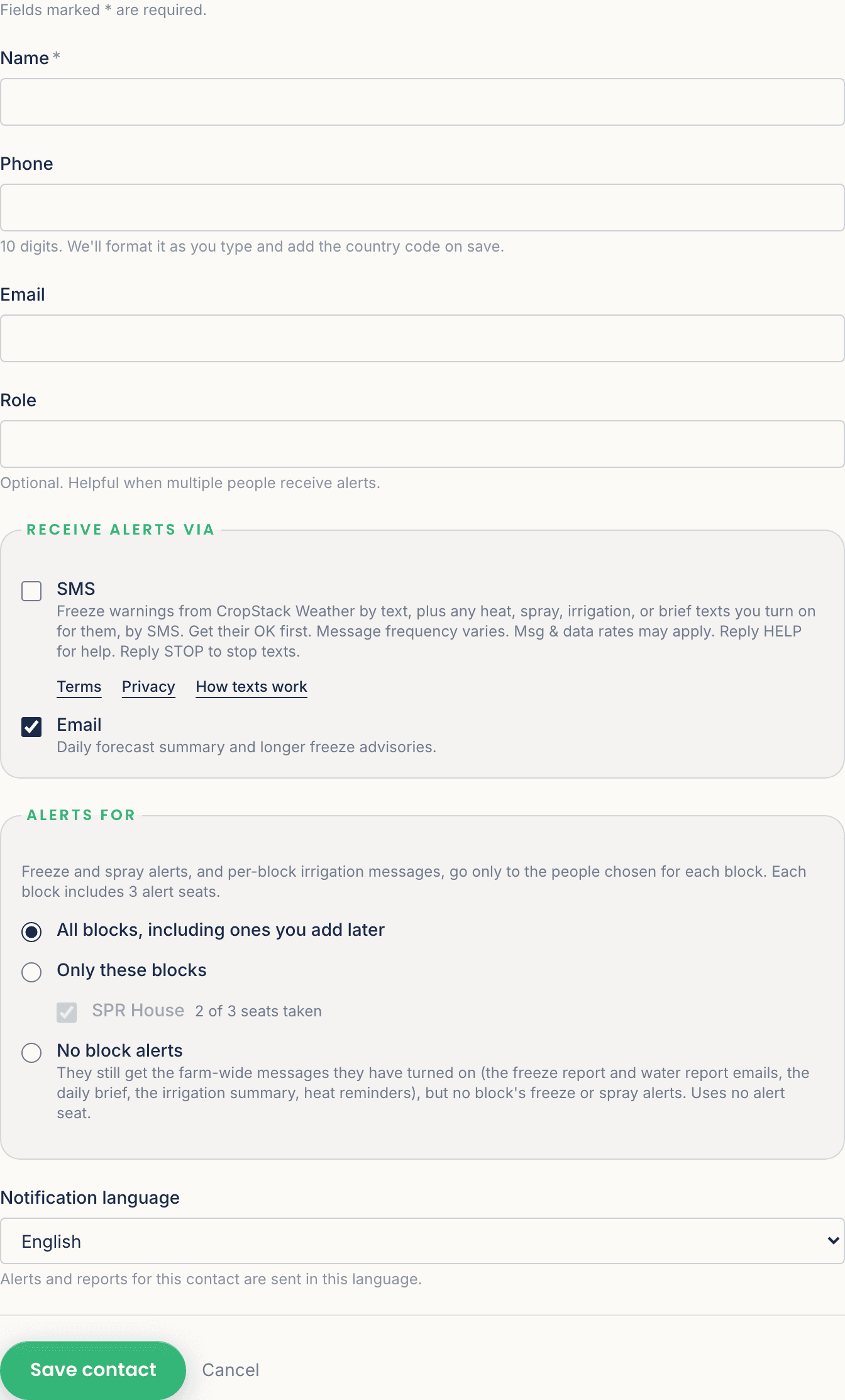
The account holder's own phone. The setup steps for a new account can turn texting on for the account holder's own phone. Text message and Email both start unchecked. To get texts, the account holder checks Text message, types their mobile number and checks a separate box, unchecked by default, that reads: "Yes, text me at [number]. I agree to get freeze alerts from CropStack Weather, plus any heat, spray, irrigation or morning brief texts I turn on later, by SMS. Freeze alerts can come at any hour. Message frequency varies. Msg & data rates may apply. Reply HELP for help. Reply STOP to stop texts." Setup will not continue with Text message checked unless that box is checked. Spanish-speaking account holders see the same statement in Spanish.
Anyone else (a crew member, a manager, an adviser). Before turning texting on, the account holder must have that person's agreement to receive these messages, and must tell them how to stop. The steps:
- Sign in at weather.cropstack.ai with an email address and a password, or a one-time code emailed to you.
- Add the farm and at least one crop block (a new account does this in the setup steps).
- Add the person, with their mobile phone number, in the farm's Contacts section, or with "Add a person" in the setup steps.
- Check the box: in Contacts, the "SMS" box under "Receive alerts via"; in setup, the box "[Name] agreed to get texts at [number]." Both are unchecked by default, both show the disclosure "Freeze warnings from CropStack Weather by text, plus any heat, spray, irrigation, or brief texts you turn on for them, by SMS. Get their OK first. Message frequency varies. Msg & data rates may apply. Reply HELP for help. Reply STOP to stop texts.", and neither saves without a phone number. Checking it turns on freeze alerts by text for that person.
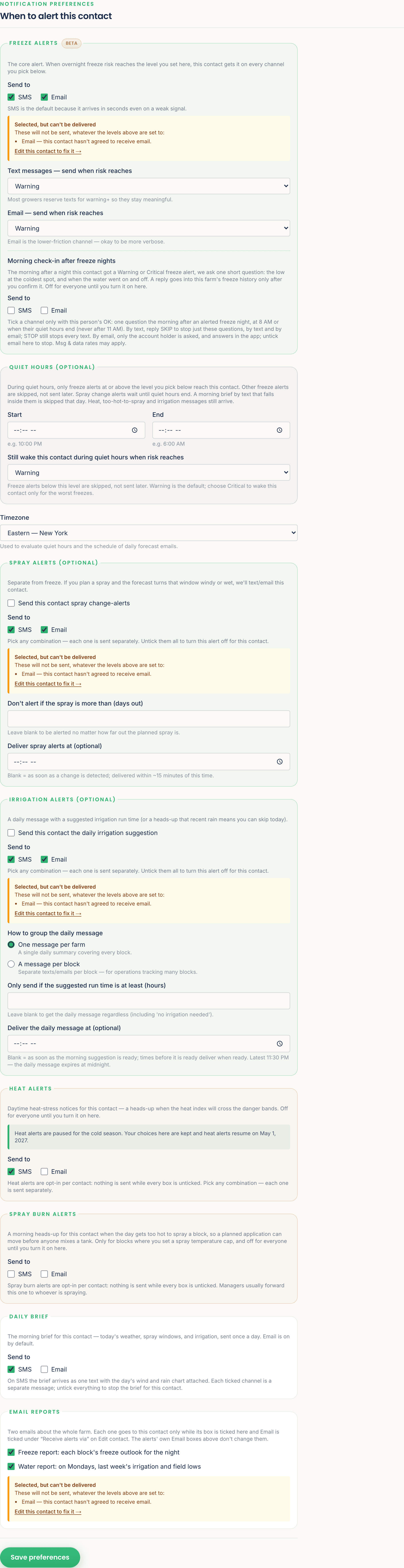
- Choose which other alerts each person gets (heat, too-hot-to-spray, spray-window, irrigation, the morning brief), whether each comes by text or email, and any quiet hours, in setup or later on the person's page. By text, every alert other than freeze starts off. For a person added in Contacts the Email box is checked by default, so the morning brief starts on by email; in setup, Email starts unchecked and the morning brief starts off until chosen. The morning check-in after a freeze night has its own boxes on the person's page, all unchecked by default, with its own consent line naming SKIP.
We keep a record of each agreement: when it was given, for which number, where (setup or Contacts) and which version of the wording was shown.
Message frequency
Frequency depends on the weather and on which alerts are turned on for a person:
- Freeze alerts: none on most nights. On a freeze night, several messages per at-risk block as the forecast is checked through the night, including after midnight.
- Heat alerts: on hot days, a morning heads-up and then about one reminder an hour during crew hours. With the standard settings that is up to about 11 messages that day for each farm, however many of its blocks have a heat threshold.
- Irrigation recommendations: once a day, or once a day for each block if the person is set to a message per block.
- The morning brief: once a day, if chosen by text.
- Morning check-in: at most one a day for each farm on each channel the person chose, at 8 AM or when their quiet hours end (never after 11 AM), and only the morning after a freeze warning.
- Too-hot-to-spray and spray-window alerts: only on days they apply.
A person listed on more than one farm receives each farm's alerts. A person set to receive an alert by both text and email receives it twice. WhatsApp alerts are paused; alerts go by text message (SMS) and email. For a person who still has WhatsApp chosen, that alert may be sent as a text to the same number instead. Freeze, heat, and too-hot-to-spray alerts and irrigation recommendations can arrive during quiet hours, because they are time-sensitive or go out early each morning.
Sample messages
- Freeze alertFREEZE WARNING, North 10, Mon 11/23 night: wet bulb below your 33F turn-on 12am-9am Tue, low 29F 6am. -CropStack
- Heat alert, morning heads-upSunny Acres: dangerous heat today — peak heat index 104°F around 2 PM. Water, shade, and breaks. -CropStack
- Heat alert, hydration reminderSunny Acres: heat index 103°F right now. Drink water and take a shade break. -CropStack
- Too-hot-to-spray alertNorth 10: spray burn risk 11 AM–5 PM today. Hold sprays in that window. -CropStack
- Irrigation recommendation (written by our AI model, so wording varies)Sunny Acres irrigation: North 10 1h 19m, South 40 skip. Text START when the water goes on. -CropStack
- Morning brief (only if chosen by text)Daily brief for Sunny Acres — Tue, Sep 22 High 91°F / Low 74°F Rain moving in around 3 PM (60% chance) Spray windows today: North 10: 7 AM-11 AM (good) View the full brief: https://weather.cropstack.ai/share/… — CropStack Weather
- Morning check-in after a freeze night (only if turned on for the person)CropStack: how did Tue 10/27 night go at Sunny Acres? Reply your low spot temp + water on/off times, e.g. 27 on 1am off 9am. SKIP ends these.
- Reply to a text sent to usWater ON logged for North 10 at 6:05 AM. Send OFF when you shut it off.
- Test message the account holder can sendCropStack Weather test. Freeze alerts will reach you here. Reply STOP to unsubscribe, HELP for info. Msg & data rates may apply.
How to stop
- To stop our messages, reply STOP to any text from us. That stops our text messages to your number, on every farm it is listed on. The other standard opt-out words (STOPALL, UNSUBSCRIBE, CANCEL, END, QUIT, REVOKE and OPTOUT) do the same when sent as a text. If an irrigation run is logged as on for your farm, a STOP or END text may also log that water as off.
- You can also send the single word UNSUBSCRIBE (in Spanish, CANCELAR) by text; it stops the same messages.
- To receive messages again after stopping them by text (STOP, UNSUBSCRIBE, or one of the other standard words above), reply UNSTOP by text. If you sent CANCELAR, send the single word RESUME (in Spanish, REANUDAR) by text.
- To stop only the morning check-in, reply SKIP (in Spanish, SALTAR) as the whole message. Freeze alerts and everything else keep coming.
- Reply HELP (or AYUDA) for the list of text commands.
- The account holder can also turn texting off for a person at any time by unchecking the SMS box on that contact, or by deleting the contact.
Sending STOP (or another opt-out word) also stops CropStack Weather alert, report and test emails to every contact listed with your number, on every farm. It does not cancel the farm's subscription.
En español: responde STOP a cualquier mensaje de texto nuestro, o envía solo la palabra CANCELAR por mensaje de texto, y dejarás de recibir nuestros mensajes de texto en todas las fincas donde aparece tu número. Para volver a recibir nuestros mensajes: después de enviar por mensaje de texto STOP, STOPALL, UNSUBSCRIBE, CANCEL, END, QUIT, REVOKE u OPTOUT, responde UNSTOP por mensaje de texto; si enviaste CANCELAR, envía REANUDAR. Para dejar solo las preguntas de la mañana después de una helada, responde SALTAR como mensaje completo; las alertas de helada y todo lo demás siguen llegando. Enviar STOP (u otra palabra de baja) también detiene los correos de alertas, informes y pruebas de CropStack Weather a todos los contactos que tienen tu número, en todas las fincas. No cancela la suscripción de la finca. Si respondes AYUDA, te enviamos la lista de comandos para registrar riegos y temperaturas mínimas por mensaje de texto. Para recibir ayuda, escribe a support@cropstack.ai.
Rates & reliability
Message and data rates may apply per your mobile carrier. Carriers are not liable for delayed or undelivered messages. Alerts are a best-effort aid and do not replace your own monitoring and judgment.
Your privacy
We do not sell your personal information, and we do not share your mobile number or opt-in data with third parties or affiliates for their marketing or promotional purposes. Phone numbers are used to send the alerts turned on for that person and to reply to texts sent to us. When a number asks us to stop or to start messages again, we keep a record of that request, even after the contact or the account is deleted. Full details are in our Privacy Policy and Terms of Service.
Contact
Questions about the text message program? Email support@cropstack.ai.